
Make it yours
Change how your scoreboard looks
Four ready-made looks, three levels of graphics, and an editor for when you want something just so. Everything you change shows on the stream straight away, even mid-game.
Pick a look
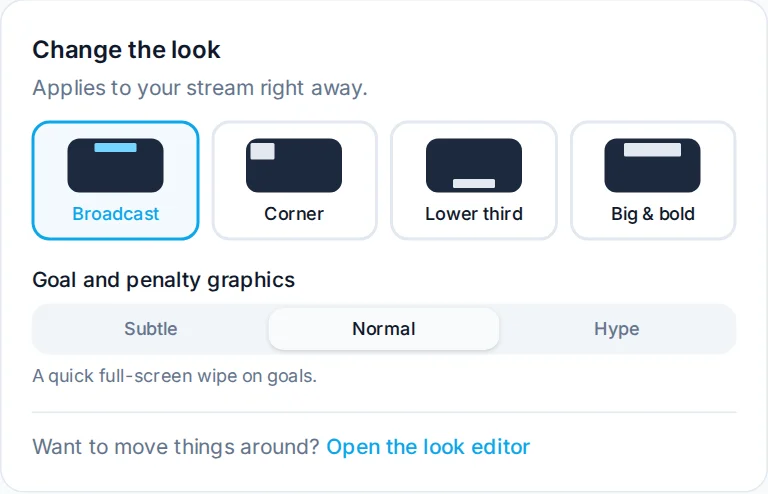
On your scoreboard home, Change the look has four styles (once you're set up, tap the Look shortcut to open it). Tap one and it's on your stream.
- Broadcast: team colours across the top, the clock in the middle. Looks like TV.
- Corner: small and tucked into a corner, so it covers the least of the ice.
- Lower third: along the bottom of the picture.
- Big & bold: larger text, easiest to read for people watching on a phone.
Goal and penalty graphics
The scoreboard plays graphics by itself when things happen in the game. Nobody has to press anything extra:
- a goal graphic with the team's logo, then the scorer and assists if you entered them
- a penalty graphic with the player, the infraction and the time
- the start and end of each period, and a final summary
- time outs and pulled goalies
Under Goal and penalty graphics, pick how much you want:
- Subtle: quick graphics that stay in the scoreboard's band and hardly cover the play.
- Normal: a short full-screen wipe on goals. The default.
- Hype: bigger and longer, for when your team scores.
Shots on goal
Shots are off to start with, because most volunteer scorekeepers have enough to do. If your league tracks them, open the look editor and turn on Shots on goal. The shot buttons then appear in the controls, and shots show on the scoreboard and in the period summaries. Turn it off again and they disappear everywhere.
Move things around
Open the look editor from Change the look to drag pieces of the scoreboard around, change colours, fonts and sizes, and pick which graphics play. The preview shows exactly what your stream will show.